PARAMETER REFERENCE
Camera Settings
Controls the viewpoint and projection method used to view 3D typography. Find the target, camera angle, perspective, zoom, and lens shift settings by purpose.
This camera settings page for 3D projection is displayed for Mug Typography 3D, Mug Typography Lite (3D), and Mug Typography Scripting. Adjust the orientation of the text itself in Global / Character Settings (or from Lua in Scripting), and adjust the viewpoint and projection method on this page.
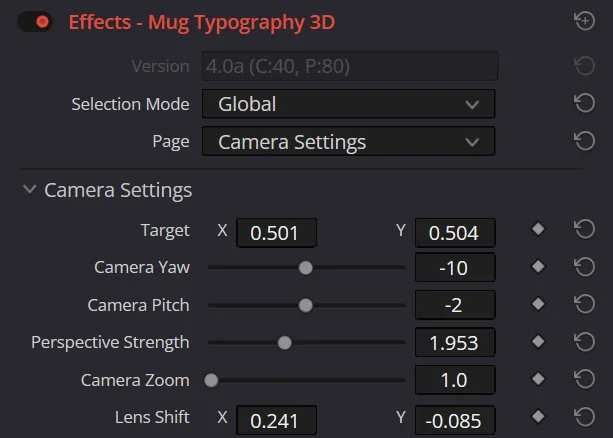
Parameters
| Parameter | Description | Default |
|---|---|---|
| Target | The position the camera looks at. It uses the same normalized coordinates as Global Position, with 0.5, 0.5 at the center of the canvas. | X0.5Y0.5 |
| Camera Yaw | The horizontal angle around the target. Positive values move the camera to the right. | 0° |
| Camera Pitch | The vertical angle around the target. Positive values look down from above. | 0° |
| Perspective Strength | The intensity of the perspective effect. Higher values produce stronger trapezoidal distortion like a close, wide-angle view, while lower values produce a flatter, telephoto-like view. | 0.5 |
| Camera Zoom | Changes the size of the projected text while preserving perspective. | 1.0 |
| Lens Shift | Shifts the projection center along the X/Y axes without rotating the viewpoint. Positive Y moves it upward. | X0.0Y0.0 |
Controlling the Camera in the Viewer
Set Selection Mode to Camera to display dedicated controls in the viewer.
| Action | Setting Changed |
|---|---|
| Drag the Orbit handle | Camera Yaw / Camera Pitch |
| WinAltMacOption + drag an empty area | Camera Yaw / Camera Pitch |
| Drag the Target Pad | Target |
| Drag the Zoom handle left or right | Camera Zoom |
| Drag the Perspective handle left or right | Perspective Strength |
| Drag an empty area outside the controls | Lens Shift |
| Hold Shift during any of the above drag operations | Constrain movement to the axis with the greater displacement |
TIP
Perspective Strength is designed to change only the perspective while preserving the apparent size. Use Camera Zoom to adjust the size within the frame, and use Global Scale when you want to change the size of the typography itself.
Choosing Between Camera and Object Controls
- Tilt all text in place: Global Yaw / Global Pitch
- Tilt only a specific character: Character Yaw / Pitch
- Move characters or parts forward or backward: Z Offset
- Change the direction from which the scene is viewed: Camera Yaw / Pitch
- Translate only the composition: Lens Shift
- Change perspective: Perspective Strength
- Change the size within the frame: Camera Zoom
ReferenceShow the full Inspector on this page