PARAMETER REFERENCE
Part Settings
Transform and color the dots, diacritics, and kanji components that make up a character on a per-part basis. This is the most granular editing level available in standard presets.
This page configures individual transformations for parts selected in Part selection mode. Each part group is labeled with the character it belongs to and its part index within that character (for example, Part Setting 1: A (part 1/2)), and each parameter name ends with (p1), (p2), and so on (for example, Pos (p1)).
IMPORTANT
Limitations in Lite presets
Individual part settings are completely disabled in the lightweight Lite presets (Lite Low / Lite Mid / Lite High / Lite (3D)). The Part Settings page in the Inspector is hidden, and parts cannot be selected or edited individually in the viewer (Part selection mode). Use a standard preset (Low / Mid / High / 3D) if you need to adjust individual parts. The Scripting preset also hides Part Settings and Part selection mode; control per-part values from a Lua script. The number of parameter slots varies depending on the selected preset (Low / Mid / High) and the settings in preferences.json. See "Limitations" in the appendix for details.
Transformations are applied in the following order: Global Transform → Character Transform → Part Transform.
Transform Parameters
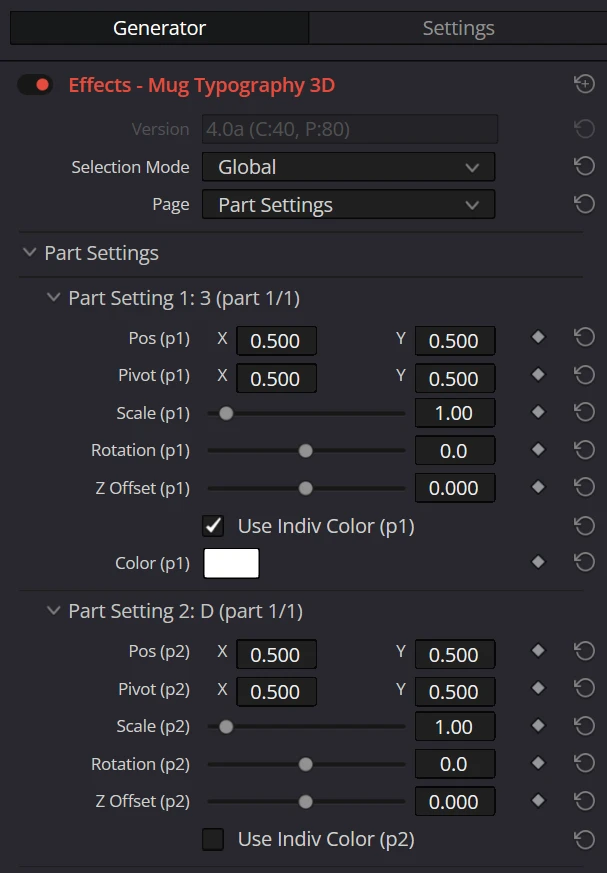
| Parameter | Description | Default |
|---|---|---|
| Pos | The part-specific position offset (X, Y). | X0.5Y0.5 |
| Pivot | The reference point for scaling and rotating the part (X, Y). | X0.5Y0.5 |
| Scale | Scales the part uniformly. | 1.0 |
| Rotation | The part's rotation angle. | 0° |
Stretch in 2D Presets
| Parameter | Description | Default |
|---|---|---|
| Stretch | Scales the part independently along the X/Y axes. It is not displayed in 3D presets. | X1.0Y1.0 |
Transforms in 3D Presets
Stretch is not displayed and cannot be used in standard 3D presets.
Z Offset is added to adjust the depth of a part. Position, Pivot, Scale, and Rotation remain available.
| Parameter | Description | Default |
|---|---|---|
| Z Offset | Moves the part farther forward or backward relative to the character's Z Offset. The value is relative to the canvas height. | 0.0 |
Part Settings is not available in Lite 3D.
Individual Color
| Parameter | Description | Default |
|---|---|---|
| Use Indiv Color | When ON, overrides the global and character color settings and uses a color dedicated to this part. When ON, Color appears. | OFF |
| Color | The per-part color (RGB + opacity). | White#ffffff |
ReferenceShow the full Inspector on this page