PARAMETER REFERENCE
Character Settings
Apply individual position, rotation, color, stroke, and shadow settings to selected characters. This page covers everything from aligning multiple characters to styling individual characters.
This page configures individual transforms for characters selected in Character selection mode. The number of parameter slots varies depending on the selected preset (Low / Mid / High) and the settings in preferences.json (see Limitations in the appendix for details).
NOTE
The Scripting preset does not show Character Settings or Character selection mode. Control per-character values from a Lua script.
Character transforms are applied in addition to the global transform.
Aligning Characters (Align Selected)
These buttons neatly rearrange multiple characters selected in the viewer while accounting for character scale. They are located at the top of the Inspector page.
IMPORTANT
Selection mode limitation
Character alignment works only when Character selection mode is active in the viewer. It does not work in Global or Part selection mode.
| Parameter | Description | Default Shortcut |
|---|---|---|
| Align Selected Horizontally | Uses the left edge of the leftmost selected character as the reference and places the other characters to its right without gaps. The characters are aligned to the same baseline (vertical position), and each character's Pivot is reset to the default (0.5, 0.5). | WinAlt+Ctrl+HMacOption+Command+H |
| Align Selected Vertically | Uses the top edge of the topmost selected character as the reference and places the other characters below it without gaps. The center axes of the column (horizontal positions) are aligned, and each character's Pivot is reset to the default (0.5, 0.5). | WinAlt+Ctrl+VMacOption+Command+V |
Alignment (Align Selected) Examples
| Alignment Direction | Example |
|---|---|
| Horizontal Alignment (Align Selected Horizontally) |  |
| Vertical Alignment (Align Selected Vertically) |  |
NOTE
Why the shortcuts use Alt + Ctrl
Unlike standard shortcuts such as Alt plus a letter, these shortcuts use Alt + Ctrl. DaVinci Resolve gives priority to host functions that consume combinations such as Alt + V for Paste Attributes. The extra modifier avoids that conflict and lets the plugin reliably capture the keystroke.
The assigned shortcut keys can be customized in the preferences.json configuration file.
Individual Character Settings (Character 1, 2...)
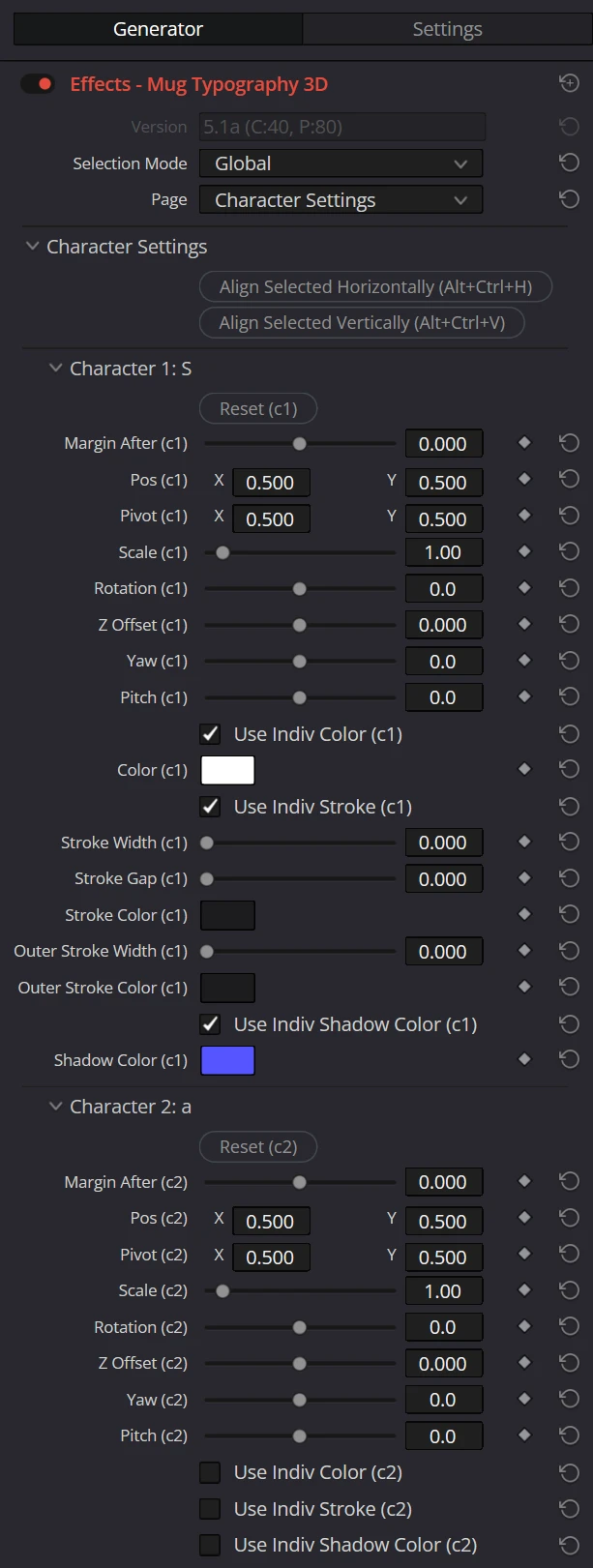
Expand a group such as Character 1: A to display individual settings for that character. The group header shows the character at that index, and each parameter name ends with (c1), (c2), and so on (for example, Pos (c1) and Reset (c1)).
Reset
| Parameter | Description |
|---|---|
| Reset (c1) | Resets the transforms, margin, individual color, individual stroke, and individual shadow color of the character and all its parts to their default values. For 3D presets, this also resets the character's Z Offset / Yaw / Pitch and each part's Z Offset. |
Margin After
| Parameter | Description | Default |
|---|---|---|
| Margin After | Specifies in em units (1.0 = one font size) how much space to add after the character. | 0.0 |
Transform Parameters
| Parameter | Description | Default |
|---|---|---|
| Pos | Per-character position offset (X, Y). | X0.5Y0.5 |
| Pivot | Reference point for character scaling and rotation (X, Y). | X0.5Y0.5 |
| Scale | Scales the character uniformly. | 1.0 |
| Rotation | Character rotation angle. | 0° |
Stretch in 2D Presets
| Parameter | Description | Default |
|---|---|---|
| Stretch | Scales the character independently along the X and Y axes. It is not displayed for 3D presets. | X1.0Y1.0 |
Transforms in 3D Presets
In 3D presets, Stretch is not displayed and cannot be used.
The following parameters are added to adjust character depth and tilt in 3D.
| Parameter | Description | Default |
|---|---|---|
| Z Offset | Moves the character along the depth axis. The value is relative to the canvas height. | 0.0 |
| Yaw | Tilts the character left or right around its Pivot. With a positive value, the right edge moves away from the camera. | 0° |
| Pitch | Tilts the character up or down around its Pivot. With a positive value, the top edge moves away from the camera. | 0° |
Position, Pivot, Scale, and Rotation are also available in 3D presets. See Camera Settings for overall camera settings.
Individual Color
| Parameter | Description | Default |
|---|---|---|
| Use Indiv Color | When ON, overrides the global color setting and uses a color specific to this character. When ON, Color appears. | OFF |
| Color | Per-character color (RGB + opacity). | White#ffffff |
Individual Stroke
| Parameter | Description | Default |
|---|---|---|
| Use Indiv Stroke | When ON, overrides the global stroke settings and uses stroke settings specific to this character. Turning it ON displays the parameters below. | OFF |
| Stroke Width | Specifies the character-specific stroke width as a ratio of the font size. | 0.0 |
| Stroke Gap | Specifies the gap between the character-specific fill and stroke as a ratio of the font size. | 0.0 |
| Stroke Color | Specifies the character-specific stroke color. | Off Black#1c1c1e |
| Outer Stroke Width | Specifies the character-specific outer outline thickness. It renders independently when Stroke Width is 0.0, and Stroke Gap is then applied between the text fill and Outer Stroke. | 0.0 |
| Outer Stroke Color | Specifies the character-specific outer stroke color. | Cool White#f2f2f7 |
NOTE
Stroke Width is calculated from the font size and does not follow the character's Scale or Stretch.
Individual Shadow Color
| Parameter | Description | Default |
|---|---|---|
| Use Indiv Shadow Color | When ON, overrides the global shadow color setting and uses a shadow color specific to this character. Turning it ON displays the parameter below. | OFF |
| Shadow Color | Specifies the character-specific shadow color (RGB + opacity). Available only when Use Indiv Shadow Color is ON. | Blue#5555ff |
NOTE
A character with its individual shadow color enabled casts a shadow even when Draw Global Shadow in Global Settings is OFF. To add a shadow only to specific characters, leave the global shadow OFF and turn ON Use Indiv Shadow Color for the target characters. The Distance and Angle values from Global Settings are shared by all shadows. Only the color can be changed individually.
ReferenceShow the full Inspector on this page