PARAMETER REFERENCE
Scripting Settings
Configure procedural animation control with Lua 5.4 scripts.
In the conventional 2D, 3D, and Lite presets, this page appears when Page is set to Scripting in the Inspector. In the dedicated Mug Typography Scripting preset, the same settings appear on the Global Settings page. For an overview and examples, see Animate with Lua Scripts (Scripting).
NOTE
Mug Typography Scripting preset This preset omits Character Settings and Part Settings and is designed to control up to 512 characters and 1,024 parts from Lua. Global settings and the 3D Camera settings remain available, but Character and Part selection modes, Copy / Paste, and the character/part Randomize controls are hidden.
Inspector Display
In a standard preset, set Page to Scripting to access these controls. In the dedicated Mug Typography Scripting preset, the same Scripting group is always displayed directly on the Global Settings page.
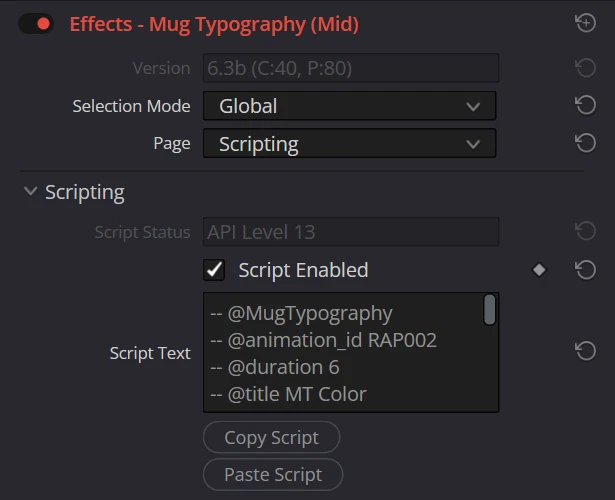
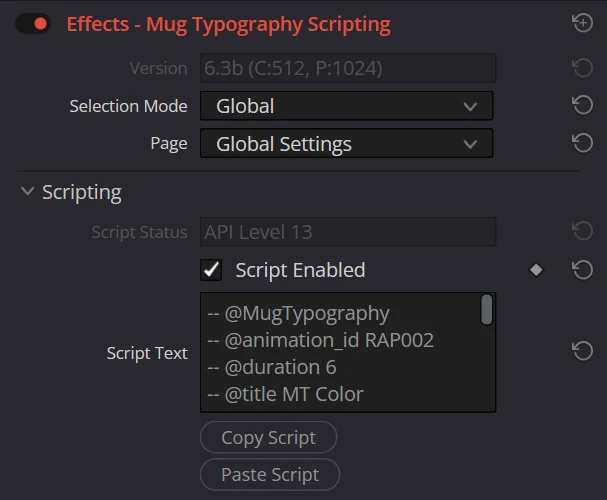
Parameters
| Parameter | Description | Default |
|---|---|---|
| Script Status | Read-only status field. Normally shows the API level supported by the plugin. If the script's @api_level exceeds that level, it shows the required and supported levels and prevents execution; if an @input line has a syntax error, it displays Input line <N>: .... | API Level 15 |
| Script Enabled | Runs the Lua script in Script Text while rendering. Scripts are time-dependent by default. Declaring @time_independent allows render reuse for frames with unchanged conditions (details). Not animatable. | OFF |
| Script Text | The Lua 5.4 script to run (multi-line). Define OnPreLayout(ctx), OnLayout(ctx), and/or OnPath(ctx). Not animatable. | An OnLayout skeleton |
| Copy Script | Copies Script Text to the OS clipboard for use in MT Sim or another editor. | - |
| Paste Script | Replaces Script Text with the text on the OS clipboard. The change can be reverted with the host's Undo command. | - |
TIP
Develop scripts in the VSCode extension The Script Text field is meant for pasting finished scripts and does not provide code completion or error diagnostics. We recommend writing and testing scripts in the bundled VSCode extension, Mug Typography Scripting Simulator (MT Sim), or the online simulator, then transferring the script with Copy Script and Paste Script.
What Scripts Can Control
| Callback | Writable targets |
|---|---|
OnPreLayout | ctx.global (text, font size, tracking, line spacing, alignment, vertical writing, position, rotation, scale, fill, gradient, stroke, shadow, and more), ctx.camera (3D / Scripting presets), ctx.shapes:declare, ctx.shape_cameras:declare, ctx.glyphs:declare |
OnLayout | ctx.chars[index] / ctx.parts[index] / ctx.shapes[index] (position, rotation, scale, pivot, individual colors, strokes, shadows, 3D orientation, and shape paths), ctx.shape_cameras[index], ctx.bounding_box, ctx.output (Write On) |
OnPath | Outline paths selected from ctx.paths (parts and shapes) |
Read-only information includes ctx.time (seconds), ctx.frame, ctx.timeline (clip duration and progress), ctx.font, ctx.meta (API level, preset capabilities, limits), and the measured geometry of characters and parts. For the complete specification, see the Lua Scripting API Reference.
Passing values from the Inspector (Script Inputs)
Declaring @input in a script makes an input field appear in the Script Inputs group, so values can be adjusted from the Inspector without editing the script. Scripts read them from ctx.inputs.
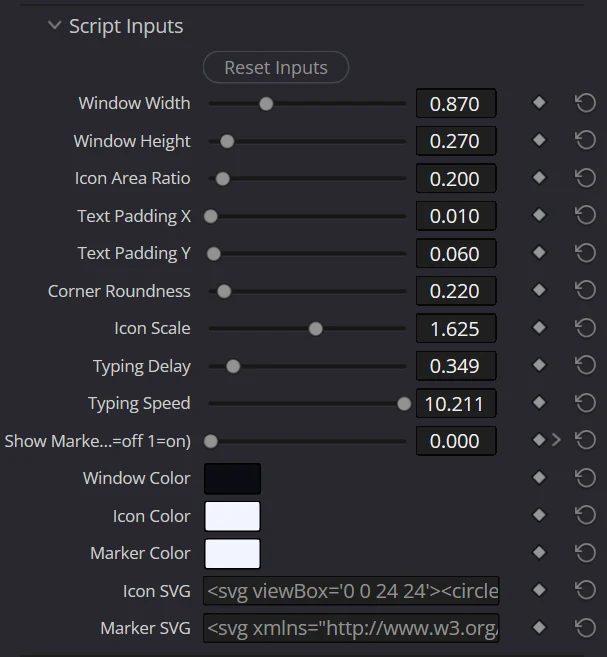
-- @input number 1 "Amplitude" default=15.0
-- @input boolean 1 "Enable Glow" default=true| Type | Count | Inspector labels | Default |
|---|---|---|---|
| Number | 14 | Number 1 - Number 14 (slider 0.0-3.0, direct input ±1000000.0) | 0.0 |
| Color | 8 | Color 1 - Color 8 | White#ffffff |
| Text | 4 | Text 1 - Text 4 | Empty |
| Boolean (checkbox) | 8 | Boolean 1 - Boolean 8 | OFF |
All Number, Color, Text, and Boolean input slots accept keyframes. Only declared fields are shown, and a script with no @input hides the group entirely.
Reset Inputs, at the top of the group, restores every input declared by the current script to its declared default.
When you replace the script, defaults are applied only to fields that are new or whose default changed; values and keyframes you have already set are preserved. See the Lua Scripting API Reference for the declaration syntax and its limits.
Time Independence and Render Reuse
Add -- @time_independent to the header only when unchanged Inspector values produce identical output at every time. The declaration takes no value. For example, it suits a static arrangement that rotates successive characters by an input angle.
-- @MugTypography
-- @time_independent
-- @input number 1 "Angle Step" default=5.0

function OnLayout(ctx)
    for index, character in mt.each_char(ctx) do
        character.rotation = (index - 1) * ctx.inputs.numbers[1]
    end
end
Place the declaration in the uninterrupted run of -- comments starting from line 1 of the file, before any blank line, indented line, code, or --[[ block comment. Omitting it preserves the default time-dependent behavior.
With this declaration and no other active time-varying effect, the plugin reuses the previous text overlay while Inspector values, script source, render dimensions, and other cache conditions remain unchanged and the cache is valid. Reused frames skip Lua execution and text rendering. Compositing still uses the current input video frame. The script is also excluded from the host's frame-varying notification.
Keyframed changes to Inspector values, including @input slots, still trigger rendering, so Inspector animation can be used with the declaration. Source edits, a missing cache, or another time-varying effect such as Pulse also require rendering.
WARNING
Do not declare this for time-driven scripts This is the author's guarantee of time-independent output, not an automatic analysis. Do not set it when output changes with ctx.time, ctx.frame, ctx.timeline, call counts, or external state. An incorrect declaration can freeze animation by reusing an earlier result. Omit it when unsure.
MT Sim parses the declaration but continues evaluating preview frames. Check reuse behavior in the plugin as well.
Edit Page Usage Notes
Generator presets have limitations when splitting clips or extending them before frame 0.
These operations can cause DaVinci Resolve to pass incorrect time information, disrupting animations that use ctx.time.
Avoid these operations, or apply the corresponding Mug Typography preset from Filters to an Adjustment Clip.
Error Behavior and Execution Limits
On the host, a script load or callback failure causes that frame not to be rendered. Changes made before the failure are not guaranteed to be rolled back, but an incomplete result is never used for rendering. The next frame is evaluated again from host-provided values.
| Failure point | Result |
|---|---|
| Script load | Does not run the script or render the frame |
OnPreLayout | Skips later callbacks and does not render the frame |
OnLayout | Skips OnPath and does not render the frame |
OnPath | Does not render the frame |
As a runaway guard, each callback invocation is limited to 5,000,000 instructions and 128 MiB of memory. Memory is allocated on demand. A callback that exceeds a limit is treated as an error, and that frame is not rendered.
WARNING
Limitations
- Values written by a script only affect that frame's rendering; they are never written back to the Inspector or keyframes
- Script callbacks are skipped while a morph animation is running (during a To Text transformation)
- Loading external
.luafiles is not supported